

Manufacturer: 8Bitdo
Current Retail Price: $39.95
Few people know that 2013 marks the 30th anniversary of the release of the original Famicom system in Japan. To commemorate this occasion 8Bitdo (who are in no way affiliated with Nintendo) have released a bluetooth gamepad that looks a lot like the first player controller from the system that rang in the modern age of console gaming. While at first glance their commemorative unit looks spot-on, is it really a worthy tribute to Nintendo’s first major home console or is it just one of the thousands of cheap forgettable electronic devices that flood the market every year trying to make a quick buck on nostalgia instead of paying proper tribute? Read on to see if we think the FC30 is nostalgic or catatonic.
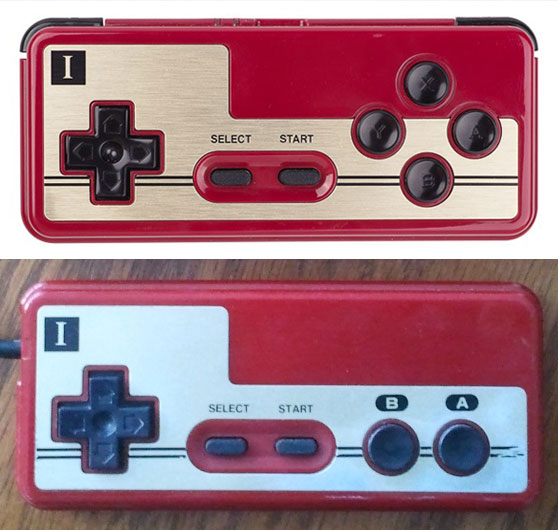
When we received our FC30 unit I was immediately impressed with the above-average care that went into the design of the device from the packaging to the unit’s build quality. There is raised ink on the front of the box and the unit comes packaged in much the same way as any higher quality electronic device on the market today. The gamepad itself is built on the outside to the utmost standards and more or less feels exactly the same as a classic Famicom controller excepting of course the extra X, Y, L & R buttons. The D-pad performs in much the same way as on the classic controller and the Start/Select buttons are even rubberized like they used to be. This outward quality also applies to the extras included in the box.

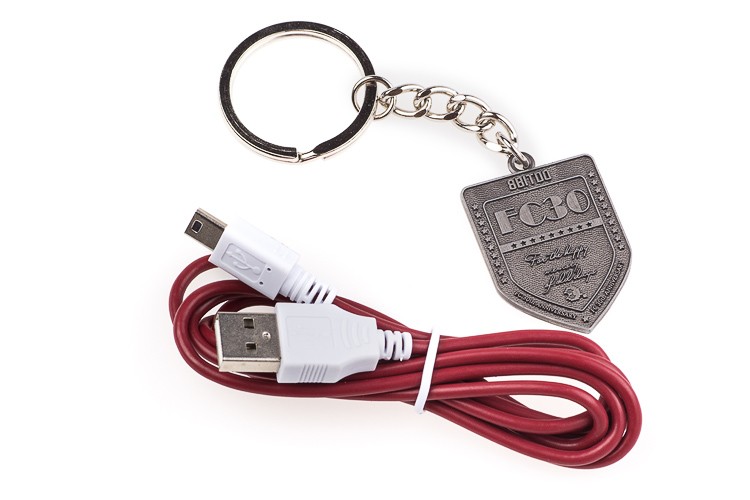
In addition to the bluetooth gamepad your $40 nets you three bonuses (pictured above): a surprisingly high quality metal FC30 keychain, a mini-USB cable that is crimson/white following the Famicom-based colour scheme, and a similarly themed stand for Android/iOS devices called the Xtander that comes clipped to the gamepad. These bonuses help lessen the impact of the otherwise high price for a bluetooth gamepad and when considered along with the overall build quality they make the FC30 an impressive package at face-value.
The functionality of the device unfortunately leaves something to be desired, though. There are currently five different modes that the FC30 can be booted into which are detailed in its online manual (you don’t get any instructions in the box): Bluetooth Gamepad, Bluetooth Keyboard, iCade, Analog touch screen, and Wired. Of these modes I was able to test four and of those four I can only vouch for two working properly.
The Bluetooth Gamepad/joystick mode, which is supposed to work with Windows and Android platforms would not work properly with the Windows 8 computers we tested it on. The FC30 would either connect and then only register random button/mouse keypresses (which are nigh on impossible to map for any proper use) or just fail to show up in the Bluetooth device list altogether. The Bluetooth keyboard mode was much the same. Listed as working with Windows, Android and iOS, only Windows was able to find the device (we unfortunately don’t have an Android device at our disposal for testing, but it does seem like the primary platform recommended for using this device). Again the button functionality in this mode was virtually unmappable and thereby practically useless for gaming purposes. The unit was detectable in OSX in keyboard mode, but yielded similarly arbitrary results to the point of uselessness.
The iCade mode did, however, work like a charm with our iOS devices. Just pair the controller in iCade mode with your iOS device and any of the 200-or-so apps compatible with iCade controllers work wonderfully (we tested Swordigo, Pix’n Love Rush DX, and Super Mega Worm to name a few). The included Xtander also comes in very handy when playing games in this way. The FC30’s Wired mode for Windows worked perfectly too, providing regular mappable buttons like any wired PC gamepad and thereby providing a robust solution for controlling a variety of programs. The “Analog touch screen” mode is only available for Android and jailbroken iOS platforms and is supposed to emulate touchscreen presses further expanding the game compatibility for the device, but since neither of such devices were available to us we cannot comment on how well it operates in the wild.
While device compatibility isn’t currently one of the FC30’s strong suits, 8Bitdo was wise enough to include firmware updating functionality. Using an Android, jailbroken iOS, or Windows device you’ll be able to upgrade the gamepad’s firmware if they ever decide it needs some patching. This leaves room for expanded Windows/OSX compatibility as well as possible compatibility patching for iOS 7, which is said to natively support bluetooth gamepads now. Even though it seems that the FC30 was designed largely for Android gamers running emulators, it’s worth it to note that Game Usagi does not condone nor recommend the use of unofficial emulators/ROMs on any device, so if you get a FC30 we suggest using it for nostalgic above-the-board purposes only.
[Update]
There have been a few firmware updates since our initial review so we decided to check back in with the FC30 and see if some of our bigger qualms with it (like compatibility issues with Windows and OSX operating systems) have been addressed.
First off we used Windows 8.1 to run the firmware update utility available on 8Bitdo’s website, we ran into a small issue of the update utility not recognizing the FC30, but it was our fault for not following the directions exactly. When updating the firmware on an FC30 be sure to hold Start+L+R before you plug the gamepad into the computer. (We kept doing it afterwards and were wondering why it wasn’t being detected by the program.)
Luckily enough, after updating to firmware v1.3 we were pleasantly surprised to fine that both Windows 8.1 and OSX 10.9 were able to easily detect and pair with the controller when it was in “bluetooth keyboard mode” (remember if it asks for a pair code just put in “0000” as with most other bluetooth devices). All of the games we tested it with were able to happily assign actions to the keys and it worked just fine.
One minor issue we did notice as we were playing games for longer periods of time with the FC30 is that the D-pad tends to get a little slippery after a while so you may find yourself wiping the controller off more than you think you should when playing for extended periods. That minor gripe aside, it’s great to see that the crew at 8Bitdo are committed to supporting their device and ensuring that it works as well as possible. With these new developments we’ve updated the score we gave the FC30 in a couple of categories to reflect how it operates with this newest firmware.
A review unit was provided to us by the gamepad’s manufacturers.