Having had the privilege of attending the Electronic Entertainment Expo, as well as all three major press conferences held in conjunction with E3, for the first time this year, I think it’s my duty to inform you about just what it’s like walking through the hallowed halls of the Los Angeles Convention Center with the Future of Gaming all around you. It was, in a word, disillusioning.
Archive for the ‘E3 2012’ Category
The Problem with E3
Tuesday, September 4th, 2012Pikmin 3 (Wii U) Impressions
Thursday, July 5th, 2012The longest playtime that we had with any single game at E3 was with Pikmin 3. Our 10 to 15 minutes with Pikmin 3 afforded us a better than average taste of just what Nintendo has incorporated into this apparently relatively early build of the game. Being a Wii U game, I’ll start off by discussing what the new system has inherently brought to the table for the Pikmin series.
The most obvious upgrade that Pikmin has received is a shiny new coat of paint courtesy of the Wii U’s increased horse power. While it looked nice, as I suspected from the peek at the game we received during Nintendo’s E3 press conference, Pikmin 3 still has a ways to go before I could call the graphics “impressive” or “amazing”. The GameCube iterations of Pikmin always looked like they were trying to be as photorealistic as possible (at least when considering their environments and items), the Wii U version, while obviously benefiting from the HD resolution insofar as aliasing and texture resolution are concerned, seems to be trying to look more like the GameCube versions than taking full advantage of the Wii U’s copious graphical powers. It more or less looks like the screenshots you see of the Dolphin Wii/GCN emulator running on high-end computers (ie. very little if any aliasing) than a AAA game you would see running on an Xbox 360 or PS3. To me, this is just evidence that Nintendo is still out of their depth as far as making truly graphically impressive HD games are concerned. While I do hope that Nintendo is able to bulk up the game’s graphics to an acceptable level for this generation of gaming (let alone the next generation) before the game’s release, history tells us that this is unlikely, so the most we can reasonably expect from Pikmin 3 is having it look like an up-rezed Wii game. We’ll just have to hope that Nintendo’s unannounced first party titles for the Wii U do more to graphically take advantage of the system’s specs than the ones that we have seen thus far.
The other improvement that Pikmin has seen thanks to the Wii U of course comes from the GamePad controller — which I wasn’t allowed to use to the control the game. The GamePad was sitting on a stand in front of the TV giving me an overhead view of the map showing where my Pikmin and various items/enemies were located while I was forced to used the Wiimote/nunchuk controller combo to scoot my non-Olimar character and his minions about. Using the Wiimote, I found that I never really had the opportunity to glace down or use the GamePad in any meaningful way since I wasn’t holding it in my hands and it was more-or-less too far away from me (at about 4-5 feet) to be of any constructive use. The only interesting feature of the GamePad that we were shown with Pikmin 3 is that after you complete a level, the screen on the GamePad can be used to scrub back and forth while watching an icon-based replay of your play through of the level so you can “analyze” where you perhaps could improve your time or score on that level.
The Wiimote controls for Pikmin 3 are essentially the same as the New Play Control method offered on the Wii versions of Pikmin and Pikmin 2. I’ve never played the Wii version of the Pikmin games, so I was rather upset to find that your Pikmin control under this control method is restricted to throwing the Pikmin, sometimes upwards of a hundred at a time, one-by-one at whatever thing you want them to attack or carry. When playing on the GameCube, I exclusively controlled my Pikmin by employing the C-Stick to move them fluidly as a group toward whatever I wanted them to interact with. In Pikmin clones like Overlord I/II, this is the only way that you have to control your followers, and rightly so. While this method of controlling Pikmin is very sorely absent from the Wiimote controls for the game, I still expect them to include this method when you’re playing the game using the GamePad or Controller Pro — if they’re not, I could not see myself enjoying this game as the “throw your Pikmin one-by-one at stuff” method is supremely tedious and perhaps even game-breakingly bad.
The game’s mechanics, apart from the disappointing control method available to me in the demo, were mostly pleasant and largely unchanged. You still parade your Pikmin minions about and have them attack/carry/build/break things in the standard Pikmin fashion, but one thing that I was upset to note is that (at least in the game mode we were shown) time limits for levels (a much disliked feature from the first Pikmin game) seem to have been reintroduced. This strikes me as odd as the evolution of the level time limits into a day/night system was one of the most touted features of Pikmin 2. Seeing a step backward of this magnitude, bringing the focus off exploration and back onto arcade-like score challenges is discouraging to say the least. There are rumours around the web that what we were shown at E3 was a level from a time-challenge mode to be featured in the game, and I very much hope that that is the case. Arbitrarily throwing a time limit back on Pikmin’s main story mode after the series has already progressed beyond such things would be a mistake, plain and simple.
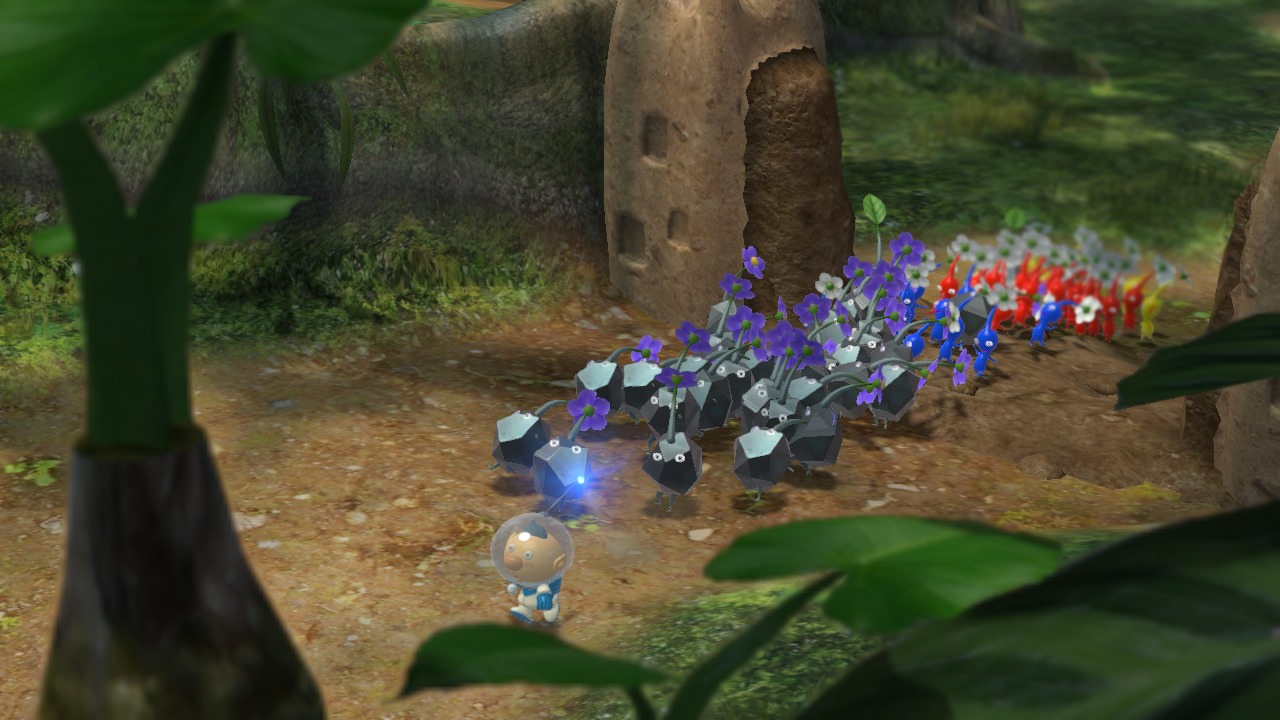
You were only able to control two types of Pikmin during the demo: Red and Rock. The red Pikmin were their usual good fighting/carrying selves and the rock Pikmin felt like a nice and natural addition to the Pikmin family. The rock Pikmin were used to break down harder barriers and stun enemies (or break their protective shells) to allow the more offensive red Pikmin to do their jobs more easily. I also used the rock Pikmin to carry broken pieces of pottery to build a shortcut bridge over water back to the spaceship, but in retrospect I could probably have used the red Pikmin as well. There were various gold items (as well as just plain simple gold) strewn about the level that would give you extra points if you collected them, adding to the arcade-like feel of the demo. At the end you were graded with a bronze/silver/gold medal on the value of the various things you collected during your limited time on the level.
So, while still obviously a fun game, Pikmin 3 left me with equal parts anticipation and concern. I’m concerned about the inclusion of time limits in the demo, as well as the apparent inferiority of the Wiimote controls and how the game doesn’t graphically look nearly as good as it could considering the Wii U’s purported capabilities. I’m excited for the prospect of playing a new Pikmin game in general, particularly one that doesn’t necessarily require me to use my TV all the time, and one that will look and perform better than those that came before it. Hopefully Nintendo will listen to the reservations held by many of the media that were fortunate enough to get an early demo of the game and we’ll see an awesome Pikmin game that is graphically astounding and that both controls and plays superbly by the time it releases (possibly even for the Wii U’s launch). We’ll keep you updated as more info on both Pikmin 3 and the Wii U comes out in the coming months, you stay tuned for more coverage.
You can see a video of a good portion of our playtime with Pikmin 3 in our E3 2012 Wii U Video Roundup.
New Super Mario Bros. U Impressions
Wednesday, June 20th, 2012
We had the opportunity to play New Super Mario Bros. U (NSMBU) with three separate control schemes at E3: controlling Mario via the GamePad, controlling Mario via a Wii Remote Plus and helping Mario using the touch screen on the Wii U GamePad. When using the GamePad as the primary controller, our PR dude Matt pointed out that we almost didn’t look at the TV at all, instead focusing on the mirror image on the GamePad’s screen. I see this as a good vote of confidence for the Wii U’s TV-less capabilities, as even when there was a big expensive HDTV showing the same thing in front of us, we preferred the immediacy of the GamePad’s screen regardless of its relative resolution. This may have been a side-effect of the novelty of having a screen in our controller, but even considering that factor, the GamePad’s screen certainly seemed to be doing its secondary display job well. Controlling Mario via a Wii Remote worked exactly as it does on New Super Mario Bros Wii — there didn’t seem to be any discrepancy between the mechanical performance of the two games. To help Mario out using the touch screen on the GamePad you tap in various areas to spawn up to four blocks at a time. If you double-tap a block it becomes slightly smaller, but will dole out coins when Mario jumps on it.
When the original NSMB came out on the DS, it was a nice refreshing throw-back to the Mario days of old. When NSMBW came out, it added Yoshis and 4-player multiplayer throughout not only improving upon the formula in meaningful ways, but also paving the way for other 4-player platformers like Rayman Origins and its currently Wii U exclusive sequel. Now with the double-whammy of NSMB coming out both on the 3DS and the Wii U, I (even with my previous history of Nintendo fanboyism) can’t help but feel that Nintendo’s just trying to print money with the series instead of attempting to make fun and novel games. If NSMBU comes out at the launch of the Wii U, it will serve as Nintendo’s standard classic Mario launch game, but I don’t see it becoming a perennial favourite that people will look back on as a high-point in Mario’s history like Super Mario 64 or Super Mario World. Even though it takes more time and effort I would much rather see Nintendo trying a unique idea for the Mario series like Super Mario Galaxy or Super Mario Sunshine then the rather paltry and assuredly short romp that will come in the NSMBU package. Don’t get me wrong, graphically the game is extremely crisp and there is nothing inherently wrong with the classic Mario platforming style, but even with the minor improvements/additions like the Flying Squirrel suit and the GamePad helper functionality it still feels far too much the same to warrant yet another $60 purchase.
Nintendo still has time to flesh out the game before its presumed launch this fall/winter and let’s hope they take it to really make the game have it’s own unique style and world. Anything shy of the depth, level-complexity, and memorability of 1990 game Super Mario World will be a bitter disappointment and a slap in the face for Nintendo gamers hoping that Nintendo has matured past its light casual gaming days and is starting to remember when it made real games. NSMBU so far looks like it may be worth it to people looking for some light fun on the Wii U, but full-priced retail games these days need to have certain amounts of content to be worthwhile and I truly hope that this game evolves into something worth the admission fee before its too late.
You can see a video of us playing NSMBU in our E3 2012 Wii U Video Roundup.
Wii U GamePad Impressions
Monday, June 18th, 2012One of the biggest deals at E3 was of course the upcoming system, the Wii U. Taking up around 98% of Nintendo’s booth, not only were there plenty of opportunities to get your hands on a Wii U GamePad, but there were also a lot of different ways in which to try it. My first experience with the Wii U GamePad was good, even though the game I tried was perhaps the worst on show for the Wii U. Tucked away at the back of the Namco Bandai booth was a demo kiosk for Tank! Tank! Tank! on the Wii U that had absolutely no line, so I seized the opportunity to have my first experience with the Wii U only to quickly discover just why the game had no line. The Tank! Tank! Tank! game was horrible in many ways that I’ll elaborate upon in its own Impressions article, but even in spite of the game’s lacking nature I was immediately impressed with the Wii U GamePad.
The face buttons on the GamePad have a “squishy” feel to them like those on the DS lite as opposed to the “clicky” feel of the buttons featured on DSi units. The NFC area below the D-pad is simply a decal and has no other indentation or texturing to differentiate it from the rest of the controller’s face. The control sticks essentially feel like those found on Wii nunchucks, but with their smooth surroundings they feel more nimble and fluid than their Wii counterparts. The D-pad is shaped well and feels good, just not quite as good as the textured one found on the Wii U Controller Pro. The L and R shoulder buttons have a small amount of give to them before their fully depressed which makes me think that they may, if only slightly, be analog as opposed to digital, but the ZR and ZL buttons, while feeling nice, were certainly and unfortunately digital instead of analog. The back of the GamePad has been given grips so that holding it is more comfortable than the first iteration of the controller shown off at last year’s E3, and it feels surprisingly light and comfortable when in-hand. The GamePad’s screen was bright and clear on every unit I played, even with all of the standard E3 lights constantly flashing about, but I did have one bone to pick with it. When doing the “bring the screen up to your nose” test that I do on all portable devices, the Wii U GamePad failed rather miserably. With systems like the PS Vita and the iPhone 4S, when you bring the screens up to your face their images stay sharp, but with the Wii U GamePad the Mario on my screen turned into a decidedly unattractive clump of blurry pixels. What this means is that the pixel density or “definition” of the GamePad’s screen is a very standard (ie. poor) one probably around a measly 854×480 pixels. In standard gameplay scenarios this shouldn’t matter much at all, but who given the choice wouldn’t want the greatest possible pixel density in any given screen? A lower-resolution screen will also be saving both Nintendo and us money, which was probably the biggest consideration in Nintendo’s decision to skimp on controller screen resolution. The touch screen, while still only being a resistive touch screen, worked really well using both styli and fingers (as is to be expected). The Tank! Tank! Tank! game, while less than stellar, at least afforded me the rare opportunity to test out the camera in the Wii U controller, which was still fairly low resolution, as is to be expected, but the image of my face that it took was still not as grainy as it could have been. One aspect of the GamePad that still needs some work is how Nintendo is using its motion sensing capabilities. For the Zelda Battle Quest Nintendo Land demo the person with the GamePad held it up to the screen as a secondary window into the game world, specifically a first-person view of the archer character, as well as in the PanoramaView demo where the GamePad was similarly used to view a 360-degree video, it was clear that much like with the MotionPlus pointing in Skyward Sword, the system without the help of the IR points fairly quickly loses track of where the “center” view is and the view can fairly easily become misaligned with the TV. Nintendo themselves noted this shortcoming in recent interviews, so let’s hope they either back-off on using the GamePad as a pointing device or find a better way in which to do so before the system launches later this year.
Overall, my experiences with the Wii U GamePad were decidedly positive and they have not only made me more excited for the Wii U’s release, but have also altered my estimations on the Wii U’s overall price when its released. Having seen and felt the combined power of the Wii U and GamePad, I think that it is reasonable to expect Nintendo to launch it for a price of $299.99 with perhaps an alternate bundle including a Wii RemotePlus and a copy of Nintendo Land for $349.99. Time will tell, of course, but I am confident that as long as Nintendo can get a good set of launch games lined up that they will have a success on their hands with the Wii U.
Kingdom Hearts 3D: Dream Drop Distance Impressions
Sunday, June 17th, 2012[cp_youtube id=”gglCdzN8vwc” points=”20″ width=660]
With our press-exclusive VIP stickers on our media badges at the Square Enix booth we were ready to… wait in line behind other people with stickers. There were, however, several games of a more line-free persuasion and one of them was the upcoming Kingdom Hearts title for the 3DS, Kingdom Hearts 3D: Dream Drop Distance (KH3D). We were going to record a nice gameplay video, but were stopped by one of the booth employees after only getting around 30 seconds of footage of the demo’s opening cutscene.
For a game that has been out in Japan since March, I was actually a little disappointed with what was on show for KH3D at E3. While my previous experience with Kingdom Hearts has been fairly limited, I always appreciate it when companies go the action RPG route as opposed to the (in almost every case) archaic and out-dated turn-based route. What I played of KH3D didn’t seem to stray too far from the classic Kingdom Hearts formula, but during the battle I did encounter something of concern. The graphics were naturally quite superb and crisp, but even with only a mild amount of action happening on screen there was a noticeable drop in frame-rate. Any lag of any description in a game on a system as capable as the 3DS is unacceptable, especially in games from respected publishers like Square Enix. Normally, I would say that there was still hope for the game to be streamlined and mended before its release date, but seeing as how it’s basically only being localized before its July 31st North American release that would be wishful thinking indeed. If you’re an avid follower of the Kingdom Hearts series, I’m sure you’ll still have a great time with this portable entry, but for people new to the series, I have a slight feeling that KH3D may end up being a less-than-superb introduction to the series if the lag I experienced is more than just a freak occurrence. The good thing is that we only have around a month to wait to see just how good (or otherwise) the localized KH3D will be, and whether or not its warm reception in Japan translates into success across the pond.
Game Usagi Staff Featured in Eurogamer E3 Gallery
Friday, June 15th, 2012
We were just browsing the E3 galleries of other websites and discovered that our Editor-in-chief (me) and Photographer (Sir Shiggy) were featured in the E3 2012 Photo Gallery on Eurogamer.net. That’s us in the 6th picture there waiting in line for the Microsoft conference to open it’s doors. I guess we’re even more internet-famous now than we already were, thanks for thinking we’re cool, Eurogamer!
Planetside 2 Beta Giveaway [UPDATE 2]
Friday, June 15th, 2012
[UPDATE 1: The first 10 first-come-first-served beta keys have been claimed. We will still be accepting entries into the draw for the last five until midnight (CST) on Monday, June 18th. No late entries will be accepted.]
[UPDATE 2: The contest is now closed, thanks to everyone for participating and we hope that if you started a Game Usagi account for this contest that you enjoy levelling up your account by earning GP. The five people who won the final draw should receive their beta keys via email shortly.]
Hey, everyone. There were a lot of codes flying around at E3 for various betas, apps, etc. and with three of us there, we usually obtained more than we could use. With PlanetSide 2, the promising upcoming free-to-play MMOFPS, we were lucky enough to get our hands on 15 beta invitations that we are going to share with you! The first 10 will be given away to the first 10 people to complete the giveaway requirements, and the last 5 will be distributed at random between the remaining entrants. Would you like to be one of the first to try out this exciting new game? This is what you need to do for your chance to get a beta key:
1. Create (or already have) a Game Usagi account by signing-up using either a social network account or just making a username/password using the links at the top of our sidebar. We don’t send out newsletters or list/use your email in any way that would ever send you spam, it’s basically only asked for in case you forget your password.
2. Email admin@gameusagi.com with your Game Usagi username in the body and the subject “Planetside 2 Giveaway”.
3. Profit.
If you are one of the ones to “win” a beta key, it will be emailed to you along with instructions on how to redeem it.